
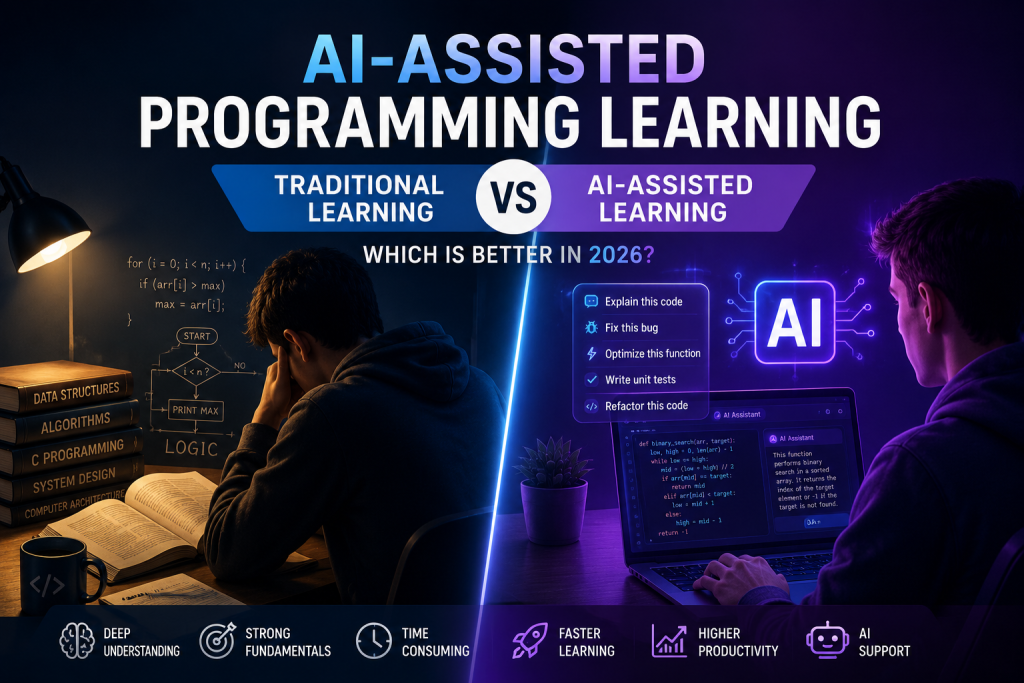
The way people learn programming has changed more in the last few years than it did in the previous two decades. Not long ago, the path was pretty straightforward — you read documentation, watched tutorials, typed out code by hand, and spent embarrassing amounts of time staring at a bug that turned out to be a missing semicolon. That was just part of the process.
Today, you can describe what you want to build and have working code in front of you in seconds. AI tools can explain errors, rewrite messy functions, and walk you through concepts in plain English. For anyone trying to learn programming right now, it’s a completely different world.
And that’s sparked a real debate. Is AI-assisted learning actually making developers better? Or is it creating a generation of people who can generate code but don’t really understand it?
The honest answer is: it’s complicated. And the right approach probably isn’t picking a side — it’s understanding what each method actually gives you.
What Traditional Programming Learning Actually Is
Before AI tools became mainstream, pretty much everyone learned programming the same way.
You read. You watched. You typed code out yourself. You hit errors you didn’t understand, went down rabbit holes trying to fix them, and eventually figured it out — usually through a combination of documentation, Stack Overflow, and sheer stubbornness.
It was slow. It was frustrating at times. But something important happened during that process: you actually built mental models of how programming works from the inside out. When you spend three hours tracking down why your recursive function is blowing the stack, you come away understanding recursion in a way that’s hard to get any other way.
Developers who came up through traditional learning tend to be strong at:
- Debugging complex, non-obvious problems
- Understanding how systems are actually structured under the hood
- Optimizing code for performance
- Writing code that other people can maintain and build on
The core strength of this approach is depth. You don’t just learn what works — you learn why it works. And that “why” turns out to matter a lot when things go wrong in production.
What AI-Assisted Programming Learning Looks Like
AI-assisted learning flips a lot of that on its head — in a good way, mostly.
Instead of grinding through a problem alone for hours,
- ask AI to explain concepts
- generate example code
- debug errors instantly
- refactor messy logic
- understand algorithms interactively
- create projects faster
Tools like Claude Code, ChatGPT Codex, Cursor AI, and GitHub Copilot have completely changed the texture of learning to code. For a beginner, it honestly feels a little like having a patient tutor available at 2am who never gets tired of explaining things. If you want a deeper comparison, check out our detailed Claude Code vs ChatGPT Codex comparison.
You can type something like:
“Build a Flask login system with SQLite”
…and get working code you can actually run and learn from.
Or:
“Why is this recursion causing a stack overflow?”
…and get a clear explanation that would have taken you two hours to piece together from documentation.
That kind of immediate, contextual feedback dramatically changes the learning experience — especially in the early stages when confusion and frustration are the biggest reasons people quit.
Why AI-Assisted Learning Is Catching On So Fast
The main reason is simple: it removes friction.
Learning to code has always had a brutal early phase where small mistakes cause big frustration and it’s hard to make meaningful progress. A lot of people hit that wall and give up. AI tools lower that wall considerably.
Instead of spending an entire day stuck on one error, you can get unstuck in ten minutes and keep moving. That keeps motivation alive — and motivation is underrated as a factor in whether someone actually becomes a developer.
AI also makes it much easier to explore. A learner can experiment with different
- frameworks,
- design patterns,
- APIs, and
- deployment approaches
without needing to spend weeks reading documentation before touching anything.
You can try something, see how it works, ask questions about it, and develop real intuition faster.
There’s also a practical reality here: AI tools aren’t going away. Modern software companies are actively adopting AI-assisted workflows. Knowing how to work effectively with these tools is increasingly a real professional skill, not a shortcut. In that sense, learning with AI isn’t just faster — it’s also more representative of how software development actually works today.
Where Traditional Learning Still Has the Edge
That said, traditional learning builds something that’s genuinely hard to replicate: the ability to solve problems independently when things get weird.
Developers who went through the manual grind have spent years debugging things that don’t make sense at first glance. They’ve built up instincts. They understand memory management, execution flow, data structures, and algorithmic thinking at a level that tends to be deeper and more durable than what you pick up when AI is doing most of the heavy lifting.
This matters more than people realize — because AI-generated code breaks. Sometimes it contains subtle bugs. Sometimes it introduces security vulnerabilities. Sometimes it misunderstands what you actually need and produces something that looks right but isn’t. A developer with solid fundamentals catches those problems quickly. A developer who’s been largely dependent on AI may not even know where to start looking.
There’s also something to be said for the patience and discipline that traditional learning builds. Debugging is hard. Sitting with a problem until you understand it is hard. Those experiences are frustrating in the moment, but they shape how you think as a developer in ways that are difficult to shortcut.
The Real Risk of Leaning Too Hard on AI
Here’s the thing nobody wants to say plainly: a lot of people are learning to generate code they don’t actually understand. And for a while, that works fine. The project runs. Things seem to be going well.
Then they hit a technical interview and can’t explain the logic they’ve been using. Or they run into a production bug and don’t know how to diagnose it. Or someone asks them about their architecture choices and they realize they never really made a choice — the AI did.
That’s a real problem, and it’s becoming more common.
Debugging skills especially are at risk here. Debugging is where a lot of real learning happens. Wrestling with a hard error forces you to understand what the code is actually doing, not just what you hoped it would do. If AI is instantly solving every error for you, you’re skipping a lot of that growth.
The bottom line is that AI can absolutely accelerate your learning — but it can also become a way to feel productive while actually developing serious gaps in your understanding. The difference comes down to how you use it.
Can Beginners Actually Learn Faster with AI?
Yes — genuinely and significantly faster.
Things that used to take months to get to — building real projects, working with APIs, understanding frameworks — are now accessible much earlier in the learning journey. That’s not a small thing. It’s genuinely easier to stay motivated when you’re building real stuff instead of grinding through abstract exercises for six months before anything interesting happens.
AI helps beginners push through the early fear and confusion, stay motivated, explore more technologies, and build portfolios earlier. That’s a meaningful advantage.
But — and this is important — speed without understanding eventually catches up with you. Moving fast through content you don’t actually grasp just means you’ll hit a wall later, usually at the worst possible time.
The best frame for using AI as a learner is to treat it like a mentor, not a vending machine. You’re not there to get outputs — you’re there to understand things better and build faster. That shift in mindset makes all the difference.
The Approach That Actually Works: Using Both
The developers who are thriving right now aren’t dogmatic about this. They’re not rejecting AI on principle, and they’re not outsourcing all their thinking to it either. They’re doing something smarter — combining both approaches based on what the situation calls for.
In practice, that looks something like this:
- Build your fundamentals the traditional way — data structures, algorithms, core concepts, how things actually work
- Use AI to guide you, get unstuck faster, and move through implementation more efficiently
- Try to debug things yourself first before asking AI — that struggle is valuable
- When AI generates code, actually read it and make sure you understand what it’s doing and why
- Build real projects, not just tutorials — projects force you to deal with problems that don’t have clean AI-generated answers
This hybrid approach gives you the best of both worlds. You develop genuine technical depth and modern productivity skills. You understand the fundamentals and you know how to use the tools that professional developers are actually using.
How AI Learning Is Changing Software Engineering Careers
The rise of AI-assisted programming is not just changing how people learn code — it’s also changing what companies expect from developers.
A few years ago, knowing how to write code manually was enough for many junior roles. Today, developers are increasingly expected to work alongside AI tools, automate repetitive tasks, prototype ideas quickly, and ship features faster than before.
Modern engineering teams are already using tools like Claude Code, ChatGPT Codex, Cursor AI, and GitHub Copilot during daily development workflows. AI is helping developers generate boilerplate code, explain unfamiliar APIs, create documentation, debug issues, and even review architecture decisions.
This shift is also changing hiring expectations. Companies are starting to value developers who know how to use AI effectively rather than developers who avoid it completely. In many cases, productivity and problem-solving ability matter more than whether every line of code was written manually.
At the same time, strong programming fundamentals are becoming even more important. Developers who truly understand algorithms, system design, debugging, and software architecture can use AI tools far more effectively than those who rely on blind copy-pasting.
The future probably belongs to developers who can combine both worlds: strong engineering fundamentals and smart AI-assisted workflows. Instead of replacing software engineers, AI is reshaping what being a good engineer actually means.
The Bottom Line
AI-assisted learning isn’t killing traditional programming education. It’s changing it.
Traditional learning still builds the strongest foundation for logical thinking, debugging instincts, and deep technical understanding. AI-assisted learning dramatically speeds up the path to real-world productivity, experimentation, and practical skills. Both of those things are true at the same time.
The developers who will do best in the coming years aren’t the ones who refuse to touch AI tools, and they’re not the ones who let AI do all their thinking for them. They’re the ones who genuinely understand how software works and know how to collaborate effectively with AI to build things faster.
Programming in 2026 isn’t just about writing code line by line anymore. It’s about understanding systems, solving real problems, and knowing how to work alongside increasingly capable tools without losing your own ability to think.
That combination — solid fundamentals plus smart use of AI — is where the real advantage is. And the good news is, anyone can build it if they’re intentional about how they learn.
Is AI-assisted programming good for beginners?
Yes, AI-assisted programming can help beginners learn faster by explaining concepts, generating examples, and helping debug errors. However, beginners should still spend time understanding why the code works instead of blindly copying AI-generated solutions.
Can developers become too dependent on AI tools?
Yes. Over-reliance on AI can weaken debugging skills and reduce deep understanding of programming fundamentals. AI should ideally be used as a learning assistant rather than a complete replacement for independent thinking.
Do professional software engineers use AI coding tools?
Absolutely. Many professional developers already use AI tools like GitHub Copilot, Claude Code, Cursor AI, and ChatGPT Codex to improve productivity, automate repetitive tasks, and accelerate development workflows.
Is traditional programming learning still important in 2026?
Yes. Traditional learning methods still help developers build strong foundations in algorithms, debugging, system design, and problem-solving. AI tools work best when combined with solid programming fundamentals.